Every way in.
ONEP is a self-hosted platform for building and running hands-on environments across networking, cybersecurity, telecommunications, and OT/ICS.
Your infrastructure. Your environments. Your rules.
Design your topology.
Drag and drop routers, switches, virtual machines, and containers onto the canvas. Connect devices, build your topology, and bring your network to life.
Make it yours with three canvas themes: Navy, Graphite, and White.
Or just describe it.
Tell the AI Assistant what you want to build. It transforms your plain-English description into a network topology, ready for you to review before deployment.
Connect a local AI model or an external API. You choose the model that powers your workflow.

Start with a ready blueprint.
Explore popular, community-built projects across networking, cybersecurity, telecommunications, and OT/ICS. Content Hub turns complete blueprints into deployable environments on your own hardware, using each project's original source.
Choose a blueprint, select a variant, and review CPU, memory, and disk requirements for every node before deployment.

Every image has a place.
Bring your own images or download them directly from vendors through Discover. A growing fingerprint registry identifies devices by manufacturer, version, and device type.
Recognized images carry a fingerprint and a tested runtime profile. Unmatched images still boot.
Downloads go straight to your hardware. Nothing is mirrored, and no vendor images come preinstalled.
Your images. Your work. Your rules.
Know it fits before you deploy.
Every environment is sized against your hardware before deployment begins.
Not enough resources? Know what you need before you deploy.

Your entire environment. One browser.
Access routers and switches through serial consoles, virtual machines through their desktops, and containers through a shell, all from one browser-based interface.
No separate terminal applications. No desktop clients. No software to install on your laptop. Just open your browser and get to work.

Your entire environment. At a glance.
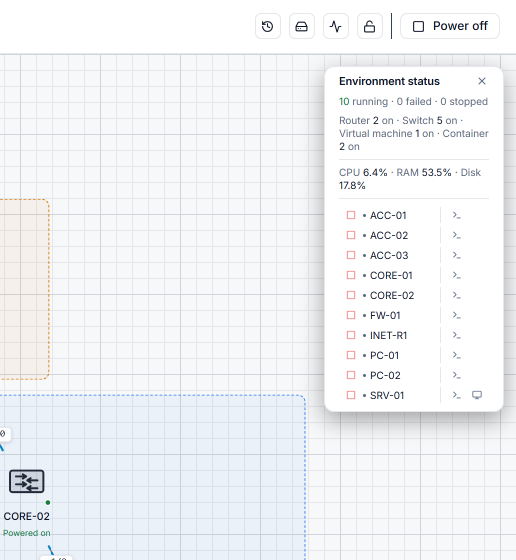
See which devices are running, stopped, or have failed, all in one place. Monitor host CPU, memory, and disk usage, and access individual device consoles directly from your topology.
Power on the entire environment or reset individual devices whenever you need to.
Your environments, organized.
Find, browse, and open any environment from one place. See its devices, connections, and runtime status before you dive in.

Capture any link.
Every link has its own virtual switch. Capture network traffic without interrupting the rest of your environment, then download the PCAP for detailed analysis.

Already built it? Bring it over.
Your topologies don't have to stay where you built them. Import projects from EVE-NG, GNS3, or Packet Tracer, or bring in a GitHub repository or URL.
Devices are identified and matched to your images, and whatever can be handled automatically is. You review only the decisions that need your input, then deploy.
Keep your work. Skip the rebuild.
Any box. Anywhere.
Access your environment remotely, whether it runs at home, in your office, or on your own infrastructure. Connect from anywhere without complicated network configuration or exposing your system.
Manage users, control access, and set the edition with your license, all from one place.

Sealed by design.
Everything runs on your hardware, with no telemetry. Environments are isolated by default, with controlled network access. License checks happen locally. Outbound connections are limited to the downloads and AI requests you choose.
Read the security page